
High Volume School Photography: Efficiency & Profit
High Volume school photography works best when the entire process is designed before picture day begins. The goal is not only to take good portraits, but to move students through the camera station smoothly, identify every image accurately, deliver galleries securely, and make ordering simple for families. With the right workflow, educational photography can become more predictable, profitable, and less stressful.
What makes High Volume school photography so demanding?
High Volume school photography is demanding because every small inefficiency repeats hundreds or thousands of times. A confusing check-in process, inconsistent lighting setup, weak file naming system, or manual ordering workflow can create hours of extra work after the shoot. The challenge is to build a repeatable system that protects privacy, keeps images organized, and gives parents a clear path to purchase school picture packages.
Unlike a smaller portrait session, school photography depends on standardization. You need consistent posing, lighting, framing, data capture, and communication so the final experience feels professional for the school and effortless for families. That does not mean the portraits should feel robotic. It means the technical and administrative process should be reliable enough that the photographer can focus on expression, posture, and student comfort.
A repeatable workflow is the foundation
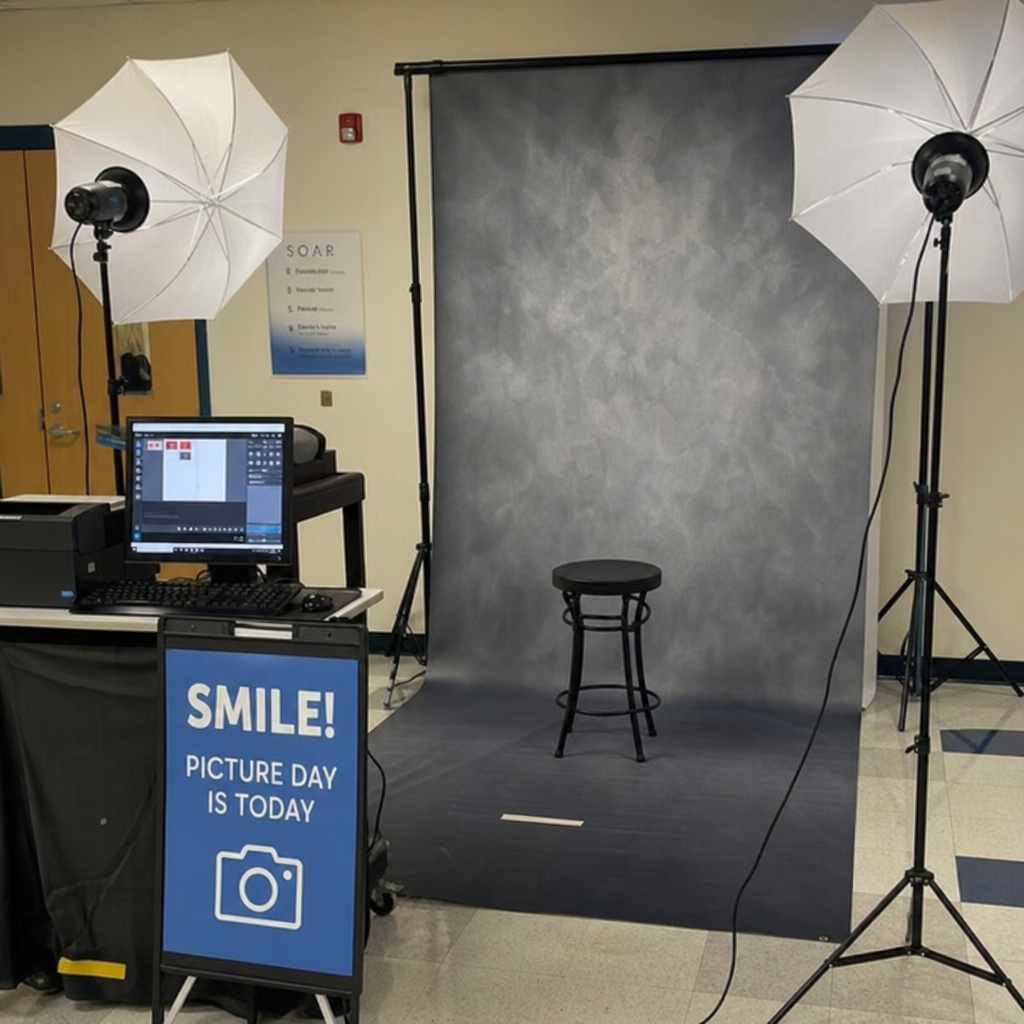
A strong workflow begins long before the camera is unpacked. The most efficient school photographers treat picture day like an operations project, not just a creative assignment. They map the student journey from arrival to ordering, then remove anything that slows movement or increases the chance of misidentification.
Start by confirming how student information will be provided. A clean CSV import can help connect names, grades, classrooms, student IDs, and family details to each gallery or access code. If the school can provide accurate data in advance, you reduce the need for handwritten forms, manual matching, and post-shoot detective work.
A practical workflow often includes:
Pre-shoot data preparation: Import student records, check for duplicate names, and confirm naming conventions with the school.
Clear traffic flow: Create separate areas for waiting, grooming, photographing, and exiting so students do not crowd the camera station.
Consistent capture routine: Use the same pose sequence, framing, lighting, and expression prompts for each student.
Immediate identification: Use QR codes, barcodes, tethered capture, or reliable file-naming systems to connect images to the right student.
Secure gallery delivery: Provide private, password-protected, or access-code-based galleries so families only see the images intended for them.
Automated order handling: Let families choose packages, pay online, and select delivery options without back-and-forth emails.
The key is to avoid relying on memory. On a busy school picture day, even an experienced team can lose track if the process depends on verbal reminders or handwritten notes. The best systems make the correct next step obvious.
Planning picture day around speed and consistency
The physical setup has a major impact on efficiency. Even a great online gallery system cannot fix a chaotic capture environment. The more consistent your shooting station is, the easier it becomes to edit, sort, and deliver images quickly.
Artificial lighting is often preferable because it gives predictable results across the whole day. Window light can be beautiful, but it changes with weather, time, and room conditions. With controlled lighting, your exposure and color remain stable, which supports faster batch editing later.
Camera choice matters, but reliability matters more than chasing novelty. A dependable camera with fast autofocus, dual card slots if available, and comfortable ergonomics can help you work quickly without sacrificing image quality. In-camera framing guides or templates can also support uniform composition, especially when multiple photographers are working on the same job.
Before the first student arrives, test the entire station. Shoot sample frames, review focus, check glasses glare, confirm background alignment, and make sure the crop works for common print sizes. A few minutes of testing can prevent hundreds of nearly identical corrections in post-production.
Capture systems that reduce mistakes
In educational photography, identification errors can be more damaging than imperfect posing. Parents expect the right images, schools expect accurate records, and photographers need a system that prevents confusion when files move through editing and sales.
QR code workflows are especially useful because they can link each student to a private gallery or data record. A student can be scanned at the station, photographed, and automatically associated with the correct gallery. This reduces manual sorting and helps protect privacy, especially when working with minors.
Some platforms also support automated uploading and grouping by person or family. That is valuable for schools with siblings, multiple campuses, or makeup days. When galleries are organized correctly from the start, parents spend less time searching and photographers spend less time answering support messages.
To keep capture clean, build a short checklist for the camera station:
Confirm the student’s identity or scan their code.
Check hair, collar, glasses, and posture quickly.
Capture the required pose or pose set.
Review only for major issues, not perfection.
Move the student along and reset for the next person.
This rhythm keeps the line moving while still leaving room for care. The goal is not to rush students through the process; it is to eliminate unnecessary pauses.
Which tools help school photographers scale?
The best tools for High Volume school photography are the ones that reduce repetitive manual work without making the process harder for schools or families. Look for software that connects client data, image sorting, private galleries, online payments, package sales, fulfillment, and communication in one practical workflow. A tool is only efficient if it saves time across the entire job, not just in one isolated step.
Platforms designed for school and event photography can help with CSV imports, gallery access codes, QR workflows, password protection, and automated grouping. Proofpix, for example, is commonly discussed in this space because it combines event setup, private galleries, QR access, ordering tools, and sorting support through mobile or desktop workflows. The specific platform you choose should fit your sales model, lab relationship, team size, and comfort with automation.
Culling and sorting tools can also make a major difference. Fast browsing software helps you reject blinks, misfires, and duplicates without waiting on heavy editing applications. AI-assisted culling can help identify obvious issues, but it should not replace a final human review, especially when expression and parent preference matter.
For editing, presets and batch adjustments are essential. If lighting and framing are consistent, you can apply base corrections across large groups, then make individual refinements only where needed. This is where planning pays off: every inconsistency during capture becomes extra labor during post-production.
Selling school picture packages without creating confusion
School picture packages should be easy to understand. Parents are often ordering between work, school activities, and household routines, so complicated menus can reduce confidence. The strongest package structures give families clear choices without overwhelming them.
A simple product ladder might include:
A basic print package: A practical option for families who want a few standard prints.
A popular middle package: A balanced choice with multiple print sizes and possibly a digital file.
A premium package: A larger bundle for families who want prints, downloads, and gift options.
Add-ons: Retouching, extra sheets, magnets, digital downloads, or sibling images where appropriate.
Clarity matters more than cleverness. Use plain descriptions, preview images when possible, and avoid forcing parents to decode print dimensions without context. If a package includes digital delivery, explain what the family can do with the file and whether printing rights are included.
Online ordering can reduce administrative work dramatically. Instead of collecting paper envelopes, counting cash, and manually entering selections, families can place orders through a secure gallery. Integrated payment options such as card or digital payment gateways also make the buying process feel familiar.
Automated fulfillment is another major efficiency gain. Some photographers prefer to self-fulfill for control, while others use lab fulfillment to save time. Either model can work, but the workflow should clearly define who crops, approves, prints, ships, and handles customer questions.
Protecting images while encouraging sales
Image protection is especially important in school photography because galleries involve minors and because unauthorized copying can reduce sales. Private access, passwords, student-specific codes, and controlled sharing settings help ensure that families see only the images they should see. This is both a trust issue and a business issue.
Watermarking can also support sales when handled thoughtfully. A strong watermark discourages copying, but it should not prevent parents from evaluating expression, sharpness, and detail. Zoomable watermarked previews, such as the type offered by some gallery platforms, can give families confidence while still protecting the final image.
Photographers should also be clear about usage rights. If digital files are sold, state whether families receive personal print rights, social sharing rights, or other permissions. Avoid vague language that creates future disputes. A short, plain explanation at checkout can prevent many support requests.
Schools may also need yearbook images, ID exports, or administrative files. If your workflow supports standardized exports, confirm requirements early. Some schools may request formats aligned with PSPA-style yearbook data standards, while others may have their own specifications.
Communication keeps the workflow moving
Even the best technical system can feel frustrating if parents and schools do not know what to expect. Communication should begin before picture day and continue through delivery, ordering deadlines, retakes, and support. The more proactive you are, the fewer individual questions you will need to answer later.
For schools, provide a concise planning guide. Include the schedule, setup needs, student flow recommendations, makeup day details, and how galleries will be distributed. Administrators are more likely to invite you back when you make their job easier.
For parents, messages should be simple and action-oriented. Tell them when picture day is happening, how their child should prepare, when galleries will be available, how to access images, and when ordering deadlines apply. If the school distributes access codes, make sure instructions are short enough to be understood quickly.
Useful parent communication touchpoints include:
A pre-picture-day reminder with clothing and grooming suggestions.
A gallery launch message with access instructions.
A deadline reminder before package pricing or ordering windows close.
A retake or makeup day notice when relevant.
A delivery update for print or digital orders.
Templates help maintain consistency, but they should still sound human. A warm, clear message builds trust and reduces friction during ordering.
Post-production should be designed for volume
Post-production is where many school photography jobs become less profitable. If every image requires individual attention, the job becomes difficult to scale. Efficient editing depends on consistency, prioritization, and knowing when an image is good enough for its purpose.
Begin by removing unusable files quickly. Blinks, motion blur, missed focus, and obvious misfires should be culled before editing. Next, apply a base preset or correction that handles exposure, contrast, white balance, and crop alignment for the full set.
From there, focus individual attention where it matters most. Fix distracting issues, choose the best expression, and ensure the final image represents the student well. Avoid over-editing. Parents usually want a clean, natural portrait that looks like their child, not a heavily processed image.
Batch export settings should match your sales and delivery needs. Web galleries, print labs, yearbook files, and administrative exports may all require different sizes or naming conventions. Build export presets so you are not recreating settings under deadline pressure.
Profitability comes from removing hidden labor
Efficiency is not only about moving faster. It is about removing unpaid labor from the process. Manual sorting, custom invoice creation, repeated parent emails, and hand-managed fulfillment can quietly consume the margin from a successful school contract.
To improve profitability, track where your time goes. Count the hours spent on pre-shoot planning, capture, editing, gallery setup, customer service, fulfillment, retakes, and school communication. If a task repeats on every job, it is a candidate for a template, automation, outsourcing step, or software upgrade.
Pricing should reflect the full workflow, not just time behind the camera. School picture packages need to cover equipment, assistants, software, payment processing, editing, lab costs, packaging, delivery, support, and administrative time. When photographers underprice the service, they often compensate by rushing or absorbing stress, neither of which supports long-term growth.
A more efficient operation can also improve the client experience. Schools get organized picture days. Parents get easier ordering. Students spend less time waiting. The photographer gains capacity to serve more schools without multiplying workload at the same rate.
A practical efficiency checklist
Before your next school photography season, review the workflow from start to finish. Look for points where people wait, files get renamed manually, parents need extra help, or orders require repeated handling. Small improvements in each stage can create a major difference across the full volume.
Use this checklist as a starting point:
Confirm student data requirements and import format before picture day.
Test QR codes, gallery access, or identification tools before arriving onsite.
Build a consistent lighting and camera setup that can be replicated in different school spaces.
Use a clear station flow so students move smoothly from waiting to photographing to exit.
Create package options that are simple, visual, and easy to compare.
Offer secure online ordering with clear payment and delivery expectations.
Use culling, batch editing, and export presets to reduce repetitive post-production work.
Protect images with private galleries, access codes, and appropriate watermarking.
Prepare communication templates for schools and parents.
Review each job afterward and document what should change next time.
The best workflow is never finished. Each season gives you new information about bottlenecks, parent questions, school preferences, and product demand.
The takeaway
High Volume school photography becomes easier to manage when it is built around repeatable systems rather than heroic effort. A strong process connects student data, consistent capture, secure galleries, simple school picture packages, automated ordering, and efficient fulfillment. When those pieces work together, educational photography can serve schools and families well while giving photographers a healthier, more scalable business.
Start with the biggest friction point in your current workflow. Fix that first, document the improved process, and then move to the next bottleneck. Over time, those refinements turn picture day from a stressful rush into a reliable production system that still leaves room for great portraits.